With few exceptions, data groups must be defined in a device template file in order for them to be available for use on a remote device. Which data groups are defined by a device template file depends on protocol, device type, and unique configuration.
CygNet distributes sample device template files for its EIEs, each of which typically serves one or more hardware models along with applicable firmware. Therefore, the data groups described in the table below are only those data groups defined by CygNet in sample device template file(s). Your template(s) might not include some of the data groups described below. Device template files exist to enable users to customize device configurations; however, CygNet is not responsible for changes made by users.
For information about data group definitions and device template files, see Device Template Files.
| Data Group Type | Usage Notes |
|---|---|
|
CfgDg |
"Configurable Data Group" |
|
Topic1 |
"Topic 1" is a sample data group demonstrating how to set up a data group. |
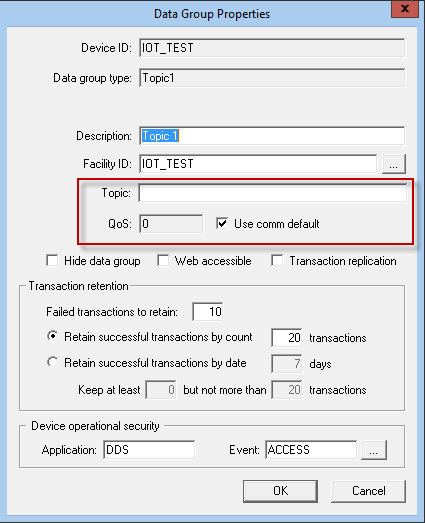
In the IoT EIE, each data group corresponds to a subscription to an MQTT topic. IoT EIE data groups include properties and fields specific only to the IoT device.
The following table lists and describes properties specific to the IoT EIE Data Group Properties dialog page.
Note: For the "Command" (Command) data group, the Topic, QoS, and Use comm default properties are displayed in the View Data dialog of the Command data group. See IoT Command Data Group for more information.
| Property | Description |
|---|---|
|
Topic |
The text in this field is the subscription topic. |
|
QoS |
When Use comm default is unchecked, the data group uses the QoS (Quality of Service) value entered in this field. Values are:
|
|
Use comm default |
When checked, the data group uses the Default QoS value specified in the device editor of the associated MQTT comm device. When unchecked, the data group uses the value specified in the QoS field of the Data Group Properties dialog. For more information, see MQTT Comm EIE. |
A payload file may include a timestamp for each data item, a timestamp for the entire payload, or no timestamp at all. When processing points, CygNet will assign timestamps in this order:
The timestamps are identified in the template file. The name of a timestamp associated with a specific data item is identified in the formats section of the payload definition. The timestamp associated with the payload file is identified using the _topicTime data group element.
When payload data indicates the connection between the MQTT server and the remote device has been lost, CygNet can be configured to set all points associated with the topic to unreliable. This feature is enabled in the template file for each data group using the setUnreliableOnLostConnection attribute. If true, all points associated with the topic are set to unreliable. Otherwise the point status is unchanged.
This feature requires a payload data item that indicates the connection status. It is identified in the template file by the itemId for the _goodConn data group element. The payload data item resolves to "true" to indicate a good connection, and "false" to indicate a lost connection.
See IoT_SampleKeyValue.dtf for an example.

|
|
|

